Mail to processing
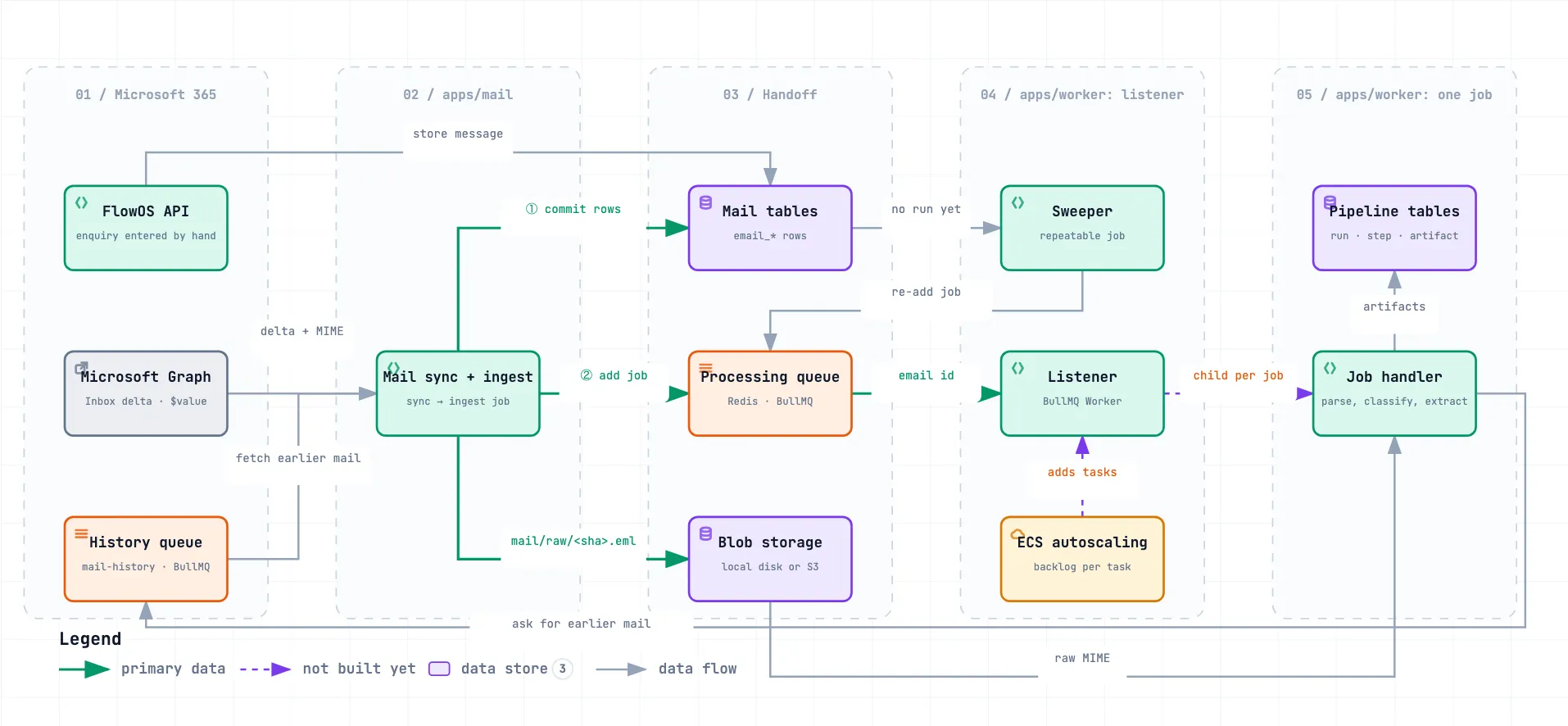
How an email travels from Microsoft 365 through the mail service and a queue to the processing workers.
The mail service reads each enrolled mailbox from Microsoft 365 and stores what it fetched. It then hands the email to the processing side through a queue.
- Mail writes the raw email to blob storage and commits its rows in Postgres, then adds a job to the processing queue. The job carries only the email’s id.
- A worker listener takes the job from the queue and runs it. It reads the rows and the raw email, then saves its results to the pipeline tables.
- A sweeper re-adds jobs for any email that was stored but never processed, or whose processing stalled, so a lost or failed job does not mean a lost email. After three stalled retries that still do not finish, it takes that email off the queue and marks it for review.
- When the worker finds an unlinked client revision request, purchase order or follow-up that names earlier emails FlowOS does not hold, it asks mail for them, and mail fetches up to 50 of them from the mailboxes the email reached, in every folder, and stores them like any other mail. Once all of them are stored, mail adds one history job for the email, which the worker processes oldest first. This is off unless
WORKER_FETCH_EARLIER_MAIL=on. - An enquiry a person enters by hand is not fetched from a mailbox. The API stores it as a message and adds the same processing job, and sync, ingestion and mailbox resets leave it alone. An enquiry entered with its lines built by hand adds no job.
The queue, the listener and the sweeper are built. Each job runs in the listener’s own process; the child process per job and the ECS autoscaling, which the diagram draws dashed, are not built yet. An email is classified, and labelled and read when it is an enquiry, only while model calls are on: the switch on the mail debug page, or WORKER_MODEL_CALLS=on while the switch is unset (the default is off). What runs today, step by step, is on Sync to labels.
How a worker claims, runs and retries a job, and how the number of workers grows with the backlog, is on Worker jobs.